
Wireless Touch Panel with Intercom Reference Guide

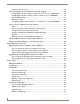
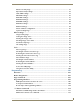
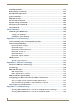
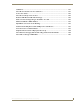

Table Of Contents
- MVP-8400iModero® ViewPoint® Wireless Touch Panel with Intercom
- MVP-8400i Modero Viewpoint Wireless Touch Panel With Intercom
- MVP-BP Power Pack
- NXA-CFSP Compact Flash
- Wireless Interface Cards
- Configuring Communications
- Modero Setup and System Settings
- Wireless Settings Page - Wireless Access Overview
- Configuring a Wireless Network Access
- Step 1: Configure the Panel’s Wireless IP Settings
- Step 2: Configure the Card’s Wireless Security Settings
- Step 3: Choose a Master Connection Mode
- Using G4 Web Control to Interact with a G4 Panel
- Using your NetLinx Master to control the G4 panel
- Upgrading MVP Firmware
- Setup Pages
- Navigation Buttons
- Setup Pages
- Information
- Protected Setup Pages
- Protected Setup Navigation Buttons
- G4 Web Control Page
- Calibration Page
- Wireless Settings Page
- Wireless Security Page
- Open (Clear Text) Settings
- Static WEP Settings
- WPA-PSK Settings
- EAP-LEAP Settings
- EAP-FAST Settings
- EAP-PEAP Settings
- EAP-TTLS Settings
- EAP-TLS Settings
- Client certificate configuration
- System Settings Page
- Other Settings
- Tools
- Programming
- Panel Calibration
- Appendix A: Text Formatting
- Appendix B - Wireless Technology
- Appendix C: Troubleshooting
- Checking AMX USBLAN device connections via Windows Device Manager
- Checking AMX USBLAN device connections via NetLinx Studio
- USB Driver
- Panel Not in Listed As a Connected Device
- Connection Status
- Panel Doesn’t Respond To Touches
- Batteries Will Not Hold Or Take A Charge
- Modero Panel Isn’t Appearing In The Online Tree Tab
- MVP Can’t Obtain a DHCP Address
- My WEP Doesn’t Seem To Be Working
- NetLinx Studio Only Detects One Of My Connected Masters
- Can’t Connect To a NetLinx Master
- Only One Modero Panel In My System Shows Up
- Panel Behaves Strangely After Downloading A Panel File Or Firmware
- Panel Fails to Charge in MVP-WDS

Table of Contents
i
MVP-7500/8400 Modero Viewpoint Wireless Touch Panels
Table of Contents
MVP-8400i Modero Viewpoint Wireless Touch Panel With Intercom .................1
Overview .................................................................................................................. 1
Specifications............................................................................................................ 2
MVP-BP Power Pack ...........................................................................................5
Overview .................................................................................................................. 5
MVP-BP Specifications .................................................................................................. 5
Installing MVP-BP Batteries ...................................................................................... 5
NXA-CFSP Compact Flash ..................................................................................7
Overview .................................................................................................................. 7
Compact Flash Card - Security .................................................................................. 7
Installing the NXA-CFSP Compact Flash Card........................................................... 7
Accessing the MVP’s Internal Components ..................................................................... 7
Removing the Installed Card ........................................................................................... 8
Installing the Compact Flash Upgrade Card.................................................................... 8
Wireless Interface Cards ...................................................................................11
802.11b Wireless Interface Card............................................................................. 11
Specifications ............................................................................................................... 11
NXA-WC80211GCF 802.11g Wireless Interface Card............................................. 12
Specifications ............................................................................................................. 13
Installing the 802.11g Card and Antenna ............................................................... 15
Firmware Requirements ................................................................................................ 15
Access the MVP’s Internal Components ........................................................................ 15
Removing the Installed Card ......................................................................................... 15
Preparing the MVP’s Rear Housing ............................................................................... 15
Installing the NXA-WC80211GCF ................................................................................. 16
Closing and Securing the MVP Enclosure...................................................................... 17
Configuring Communications ...........................................................................19
Modero Setup and System Settings ....................................................................... 19
Accessing the Setup and Protected Setup Pages.......................................................... 19
Setting the Panel’s Device Number .............................................................................. 20
Wireless Settings Page - Wireless Access Overview ............................................... 20
Hot Swapping ............................................................................................................... 20
Configuring a Wireless Network Access ................................................................. 21
Step 1: Configure the Panel’s Wireless IP Settings ................................................. 21
Wireless communication using a DHCP Address ........................................................... 21
Wireless communication using a Static IP Address........................................................ 22