
Wireless Touch Panel with Intercom Reference Guide
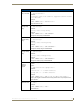
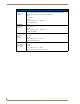
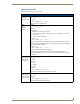
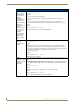
Table Of Contents
- MVP-8400iModero® ViewPoint® Wireless Touch Panel with Intercom
- MVP-8400i Modero Viewpoint Wireless Touch Panel With Intercom
- MVP-BP Power Pack
- NXA-CFSP Compact Flash
- Wireless Interface Cards
- Configuring Communications
- Modero Setup and System Settings
- Wireless Settings Page - Wireless Access Overview
- Configuring a Wireless Network Access
- Step 1: Configure the Panel’s Wireless IP Settings
- Step 2: Configure the Card’s Wireless Security Settings
- Step 3: Choose a Master Connection Mode
- Using G4 Web Control to Interact with a G4 Panel
- Using your NetLinx Master to control the G4 panel
- Upgrading MVP Firmware
- Setup Pages
- Navigation Buttons
- Setup Pages
- Information
- Protected Setup Pages
- Protected Setup Navigation Buttons
- G4 Web Control Page
- Calibration Page
- Wireless Settings Page
- Wireless Security Page
- Open (Clear Text) Settings
- Static WEP Settings
- WPA-PSK Settings
- EAP-LEAP Settings
- EAP-FAST Settings
- EAP-PEAP Settings
- EAP-TTLS Settings
- EAP-TLS Settings
- Client certificate configuration
- System Settings Page
- Other Settings
- Tools
- Programming
- Panel Calibration
- Appendix A: Text Formatting
- Appendix B - Wireless Technology
- Appendix C: Troubleshooting
- Checking AMX USBLAN device connections via Windows Device Manager
- Checking AMX USBLAN device connections via NetLinx Studio
- USB Driver
- Panel Not in Listed As a Connected Device
- Connection Status
- Panel Doesn’t Respond To Touches
- Batteries Will Not Hold Or Take A Charge
- Modero Panel Isn’t Appearing In The Online Tree Tab
- MVP Can’t Obtain a DHCP Address
- My WEP Doesn’t Seem To Be Working
- NetLinx Studio Only Detects One Of My Connected Masters
- Can’t Connect To a NetLinx Master
- Only One Modero Panel In My System Shows Up
- Panel Behaves Strangely After Downloading A Panel File Or Firmware
- Panel Fails to Charge in MVP-WDS
Programming
149
MVP-8400i Modero Viewpoint Wireless Touch Panels
Embedded codes
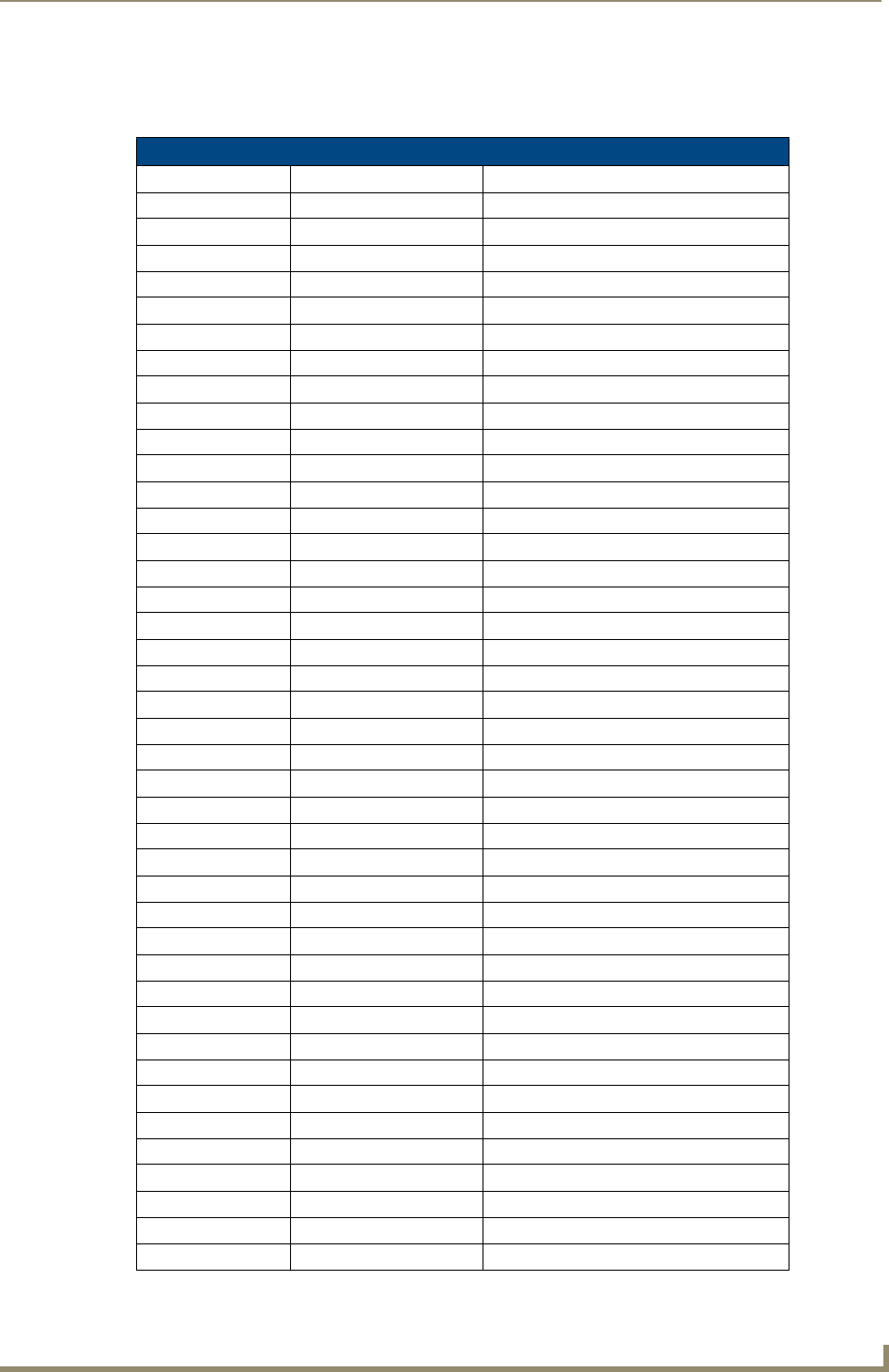
The following is a list of G4 compatible embedded codes:
Embedded Codes
Decimal numbers Hexidecimal values Virtual keystroke
8 ($08) Backspace
13 ($0D) Enter
27 ($1B) ESC
128 ($80) CTRL key down
129 ($81) ALT key down
130 ($82) Shift key down
131 ($83) F1
132 ($84) F2
133 ($85) F3
134 ($86) F4
135 ($87) F5
136 ($88) F6
137 ($89) F7
138 ($8A) F8
139 ($8B) F9
140 ($8C) F10
141 ($8D) F11
142 ($8E) F12
143 ($8F) Num Lock
144 ($90) Caps Lock
145 ($91) Insert
146 ($92) Delete
147 ($93) Home
148 ($94) End
149 ($95) Page Up
150 ($96) Page Down
151 ($97) Scroll Lock
152 ($98) Pause
153 ($99) Break
154 ($9A) Print Screen
155 ($9B) SYSRQ
156 ($9C) Tab
157 ($9D) Windows
158 ($9E) Menu
159 ($9F) Up Arrow
160 ($A0) Down Arrow
161 ($A1) Left Arrow
162 ($A2) Right Arrow
192 ($C0) CTRL key up
193 ($C1) ALT key up
194 ($C2) Shift key up