
Wireless Touch Panel with Intercom Reference Guide
Table Of Contents
- MVP-8400iModero® ViewPoint® Wireless Touch Panel with Intercom
- MVP-8400i Modero Viewpoint Wireless Touch Panel With Intercom
- MVP-BP Power Pack
- NXA-CFSP Compact Flash
- Wireless Interface Cards
- Configuring Communications
- Modero Setup and System Settings
- Wireless Settings Page - Wireless Access Overview
- Configuring a Wireless Network Access
- Step 1: Configure the Panel’s Wireless IP Settings
- Step 2: Configure the Card’s Wireless Security Settings
- Step 3: Choose a Master Connection Mode
- Using G4 Web Control to Interact with a G4 Panel
- Using your NetLinx Master to control the G4 panel
- Upgrading MVP Firmware
- Setup Pages
- Navigation Buttons
- Setup Pages
- Information
- Protected Setup Pages
- Protected Setup Navigation Buttons
- G4 Web Control Page
- Calibration Page
- Wireless Settings Page
- Wireless Security Page
- Open (Clear Text) Settings
- Static WEP Settings
- WPA-PSK Settings
- EAP-LEAP Settings
- EAP-FAST Settings
- EAP-PEAP Settings
- EAP-TTLS Settings
- EAP-TLS Settings
- Client certificate configuration
- System Settings Page
- Other Settings
- Tools
- Programming
- Panel Calibration
- Appendix A: Text Formatting
- Appendix B - Wireless Technology
- Appendix C: Troubleshooting
- Checking AMX USBLAN device connections via Windows Device Manager
- Checking AMX USBLAN device connections via NetLinx Studio
- USB Driver
- Panel Not in Listed As a Connected Device
- Connection Status
- Panel Doesn’t Respond To Touches
- Batteries Will Not Hold Or Take A Charge
- Modero Panel Isn’t Appearing In The Online Tree Tab
- MVP Can’t Obtain a DHCP Address
- My WEP Doesn’t Seem To Be Working
- NetLinx Studio Only Detects One Of My Connected Masters
- Can’t Connect To a NetLinx Master
- Only One Modero Panel In My System Shows Up
- Panel Behaves Strangely After Downloading A Panel File Or Firmware
- Panel Fails to Charge in MVP-WDS
Programming
124
MVP-8400i Modero Viewpoint Wireless Touch Panels
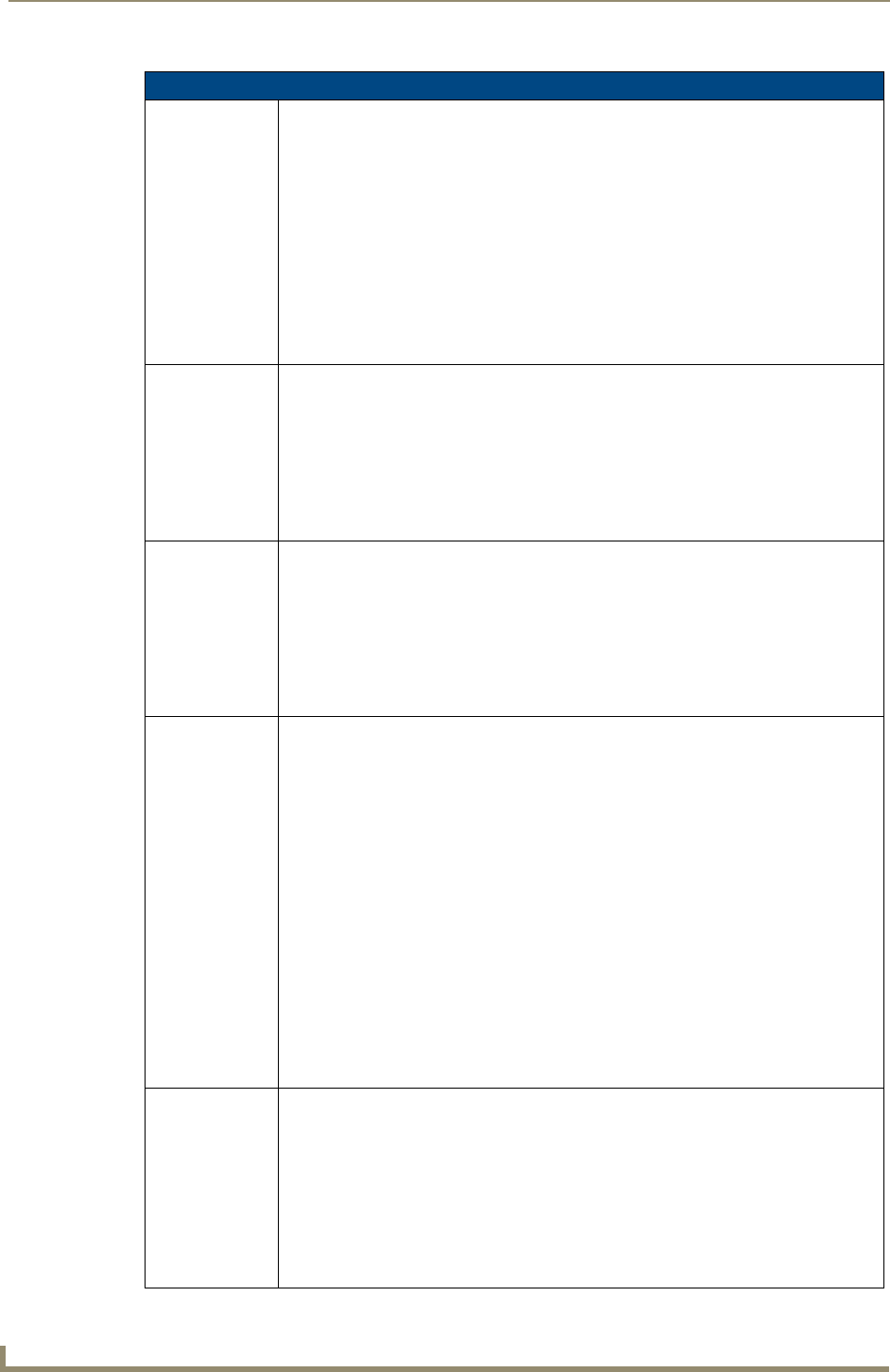
"^" Button Commands (Cont.)
^BWW
Set the button
word wrap
feature to those
buttons with a
defined address
range.
By default, word-wrap is Off.
Syntax:
"'^BWW-<vt addr range>,<button states range>,<word wrap>'"
Variable:
variable text address range = 1 - 4000.
button states range = 1 - 256 for multi-state buttons (0 = All states, for General buttons
1 = Off state and 2 = On state).
word wrap = (0=Off and 1=On). Default is Off.
Example:
SEND_COMMAND Panel,"'^BWW-500,1,1'"
Sets the word wrap on for the button’s Off state.
^CPF
Clear all page flips
from a button.
Syntax:
"'^CPF-<vt addr range>'"
Variable:
variable text address range = 1 - 4000.
Example:
SEND_COMMAND Panel,"'^CPF-500'"
Clears all page flips from the button.
^DLD
Set the disable
cradle LED flag.
Syntax:
"'^DLD-<status>'"
Variable:
status = (0= cradle operates normally, 1= forces the cradle LEDs to always be dim).
Example:
SEND_COMMAND Panel,"'^DLD-1'"
Disables the cradle LEDs.
^DPF
Delete page flips
from button if it
already exists.
Syntax:
"'^DFP-<vt addr range>,<actions>,<page name>'"
Variable:
variable text address range = 1 - 4000.
actions = Stan[dardPage] - Flip to standard page
Prev[iousPage] - Flip to previous page
Show[Popup] - Show Popup page
Hide[Popup] - Hide Popup page
Togg[lePopup] - Toggle popup state
ClearG[roup] - Clear popup page group from all pages
ClearP[age] - Clear all popup pages from a page with the
specified page name
ClearA[ll] - Clear all popup pages from all pages
page name = 1 - 50 ASCII characters.
Example:
SEND COMMAND Panel,"'^DPF-409,Prev'"
Deletes the assignment of a button from flipping to a previous page.
^ENA
Enable or
disable buttons
with a set
variable text
range.
Syntax:
"'^ENA-<vt addr range>,<command value>'"
Variable:
variable text address range = 1 - 4000.
command value = (0= disable, 1= enable)
Example:
SEND_COMMAND Panel,"'^ENA-500.504&510.515,0'"
Disables button pushes on buttons with variable text range 500-504 & 510-515.