
Wireless Touch Panel with Intercom Reference Guide
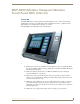
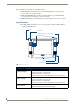

Table Of Contents
- MVP-8400iModero® ViewPoint® Wireless Touch Panel with Intercom
- MVP-8400i Modero Viewpoint Wireless Touch Panel With Intercom
- MVP-BP Power Pack
- NXA-CFSP Compact Flash
- Wireless Interface Cards
- Configuring Communications
- Modero Setup and System Settings
- Wireless Settings Page - Wireless Access Overview
- Configuring a Wireless Network Access
- Step 1: Configure the Panel’s Wireless IP Settings
- Step 2: Configure the Card’s Wireless Security Settings
- Step 3: Choose a Master Connection Mode
- Using G4 Web Control to Interact with a G4 Panel
- Using your NetLinx Master to control the G4 panel
- Upgrading MVP Firmware
- Setup Pages
- Navigation Buttons
- Setup Pages
- Information
- Protected Setup Pages
- Protected Setup Navigation Buttons
- G4 Web Control Page
- Calibration Page
- Wireless Settings Page
- Wireless Security Page
- Open (Clear Text) Settings
- Static WEP Settings
- WPA-PSK Settings
- EAP-LEAP Settings
- EAP-FAST Settings
- EAP-PEAP Settings
- EAP-TTLS Settings
- EAP-TLS Settings
- Client certificate configuration
- System Settings Page
- Other Settings
- Tools
- Programming
- Panel Calibration
- Appendix A: Text Formatting
- Appendix B - Wireless Technology
- Appendix C: Troubleshooting
- Checking AMX USBLAN device connections via Windows Device Manager
- Checking AMX USBLAN device connections via NetLinx Studio
- USB Driver
- Panel Not in Listed As a Connected Device
- Connection Status
- Panel Doesn’t Respond To Touches
- Batteries Will Not Hold Or Take A Charge
- Modero Panel Isn’t Appearing In The Online Tree Tab
- MVP Can’t Obtain a DHCP Address
- My WEP Doesn’t Seem To Be Working
- NetLinx Studio Only Detects One Of My Connected Masters
- Can’t Connect To a NetLinx Master
- Only One Modero Panel In My System Shows Up
- Panel Behaves Strangely After Downloading A Panel File Or Firmware
- Panel Fails to Charge in MVP-WDS
MVP-8400i Modero Viewpoint Wireless Touch Panel With Intercom
3
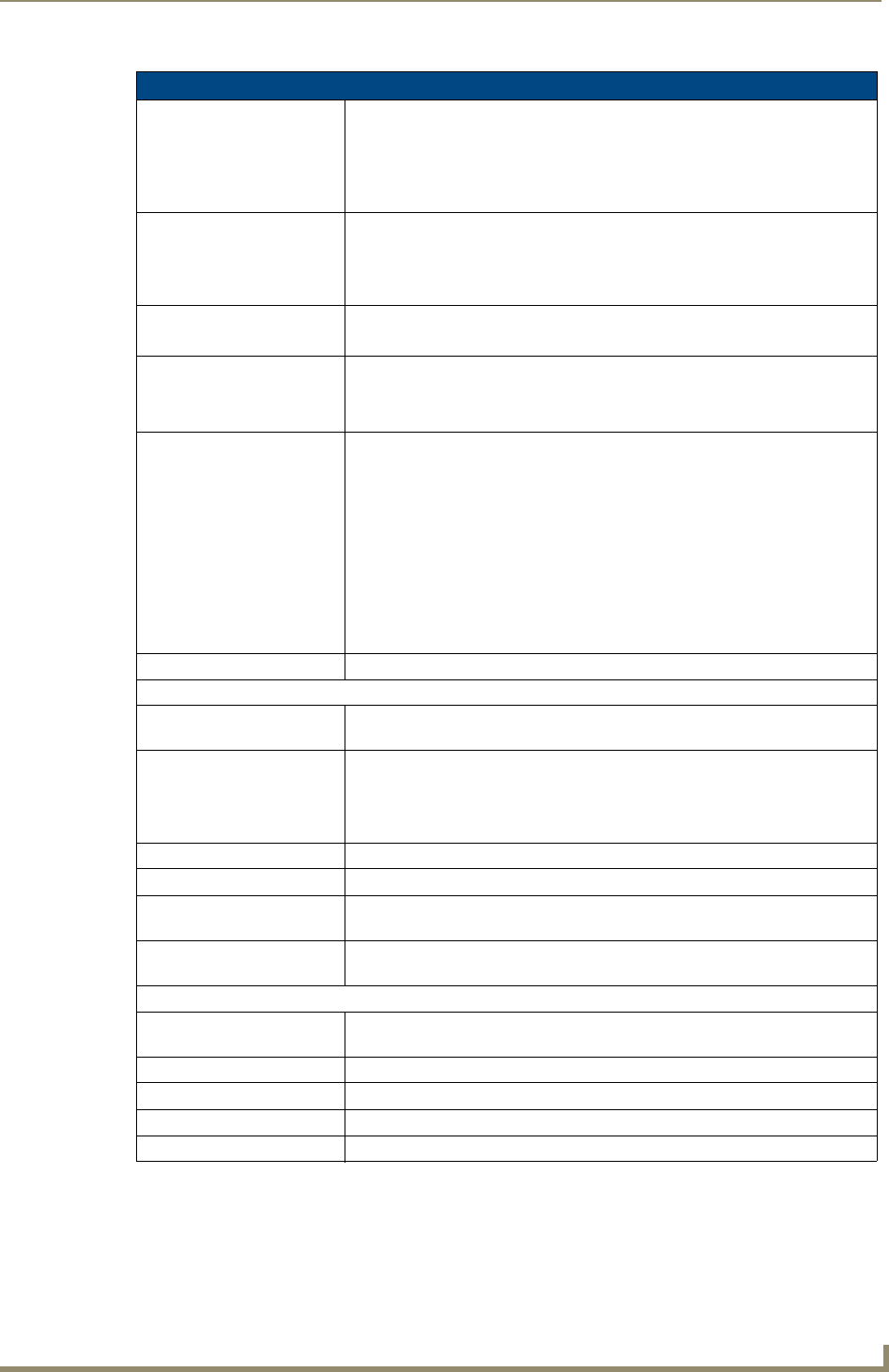
MVP-8400i Modero Viewpoint Wireless Touch Panels
MVP-8400i Specifications (FG5965-04) (Cont.)
Power Modes: • ON: Panel is fully functional.
• STANDBY: Panel uses low power, the LCD/backlight is shutdown, LEDs still
function. Panel resumes the ON mode in ~ 1 second.
• OFF: On-board programs not running, touch screen still powered, LED not
functional. Panel resumes the ON mode in ~ 30 seconds.
Battery Duration:
(per battery)
• Eight hours of normal use (25% On state, 25% Standby, and 50% Off).
• Four hours of continuous use (continuous On state).
The MVP-8400i panel is shipped with two MVP-BP batteries. You must use
both batteries to obtain the duration times given above.
Memory (factory default): • 128 MB SDRAM
• 128 MB Compact Flash (upgradable to 1 GB) - factory programmed
Weight: 1.85 lbs (0.84 kg)
• with 1 battery: 2.25 lbs (1.02 kg)
• with 2 batteries: 2.65 lbs (1.20 kg)
MVP-8400i LCD
Specifications:
• Aspect ratio: 4 x 3
• Brightness (luminance): 180 cd/m
2
• Channel transparency: 8-bit Alpha blending
• Contrast ratio: 350:1
• Display colors: 256K colors (18-bit color depth)
• Dot/pixel pitch: 0.21 mm
• Panel type: TFT Color Active-Matrix
• Screen resolution: 800 x 600 pixels (HV) @ 60 Hz frame frequency
• Viewing angles (vertical): + 60° / - 40° (from center)
Active Screen Area: • 6.71” x 5.03” (17.04cm x 12.78cm)
External Components:
Docking station interface
connector:
Metallic strip connector located on the bottom panel provides communication
and power between the panel and the optional docking stations.
LEDs: Two sets of NetLinx programmable LEDs (supporting On, Off, and Blink).
Default blink patterns:
- Stylus LED: Blink = Batteries charging, On = Batteries charged.
- Front panel LED: Blink = Panel booting, On = Panel operating properly.
Mini-USB connector: 5-pin mini-USB connector for programming, firmware update, and file transfer.
Power connector: • 2.1mm barrel-style power jack, for use with the included PS4.4 power supply.
Stylus slot: • Illuminated slot where the included stylus is stored, located on the left side of
the MVP.
External Buttons: • Nine programmable pushbuttons (four located on the left of the LCD and five
located on the right in a joystick configuration).
Internal Components:
Wireless Interface card: Provides 802.11 (CF Type I) wireless connectivity between the panel and a
Wireless Access Point (such as the NXA-WAP200G).
IR Emitters: Transmit IR over 20 feet (6.10 m).
Internal speaker: Single 2 watt speaker.
Internal microphone For use with the intercom feature
Battery compartment: Houses up to 2 MVP-BP Power Packs.