
Technical data



SPEEDDOME ULTRA 8 CONFIGURATION UTILITY 8200-0600-01, REV. C
OPERATOR’S GUIDE
94 of 138
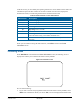
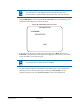
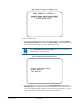
Figure 87. Base IO Control screen
Note: Each time you upload new code to the dome, be sure to update the IO
base as well. If the number to the left of the arrow is lower than the number to
the right, highlight this line to start the firmware upgrade.
When you are finished working with the base IO controls, select Exit to return to the Dome
Information screen.
Changing the Dome Address
When a dome powers up, it finds Pan/Tilt home, determines the network type, and sequentially
performs the following three tests:
1. The dome checks to see if its own address has changed. If its own address changed since
the last time it was powered up, the dome local configuration memory is cleared.
2. Next, the dome checks to see if its address matches the IO base address.
• If the dome address does not match the address currently stored in the IO base, the
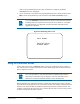
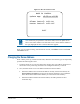
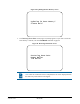
Dome Address Changed screen (
Figure 88) appears and allows you to update the
dome data from the IO board base memory or to clear the IO base memory.
• If the dome address matches the IO base address, the dome performs the next
verification step.
BASE IO CONTROL
Update App: v2.30 => v2.30
Blower Control: AUTO ON
Heater Control: AUTO OFF
EXIT