
Specifications




SPEEDDOME ULTRA PRESSURIZED OUTDOOR DOME HOUSING 8200-0462-01, REV. B
INSTALLATION AND SERVICE GUIDE
4 of 10
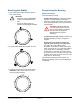
8. Remove the bubble assembly from the housing
to access the I/O circuit board inside the
housing.
a. Loosen the nine captive screws on the ring
next to the bubble. Do not to back screws all
the way out.
b. Twist the bubble counter clockwise to
remove.
Calibrating the Pressure Sensor
The housing includes an absolute pressure sensor
that must be calibrated, at the site, just before
installation.
1. To access the pressure sensor, pull on the dust
cover to remove the I/O circuit board from base.
2. Apply power to the housing and wait about 30
seconds for the green LED to start blinking.
3. Press the calibration button until the LED goes
out.
4. Snap the I/O circuit board back into its installed
position and remove the dust cover.
Loosen screws, do
not remove them.
Remove the
bubble by
twisting
counterclockwise.
I/O Circuit
Board
Dust
Cover
Green
LED
Calibration
Button