
Operating Guide





30 PIX-3000x Operations Manual
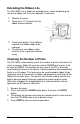
Extending the Ribbon Life
The PIX-3000x has a ribbon life extender lever, which will prolong the
use of the ribbon until it can be replaced. To activate:
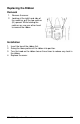
1. Remove the cover.
2. Grasp lever "A" and pull until the
ribbon moves outward.
3. Check print quality. If print did not
improve, the ribbon needs to be
replaced.
4. If installing a new ribbon, make
sure this lever is pushed in before
using.
Checking the Number of Prints
The PIX-3000x automatically counts the number of prints and stores this
value in memory. When the counter reaches 999999 print cycles, it will
be reset to 000000. The counter will also reset if the PIX is manually
reset to default values or the battery is disconnected or discharged while
there is no AC power. This feature can be used to predict ribbon life by
noting the value of the counter at ribbon replacement or activation of the
ribbon life extender lever. The counter can also be used to monitor the
battery during a power failure by tracking the remaining print cycles.
When fully charged, the installed battery is rated to maintain normal
operations for 62 hours or 400 prints.
1. Remove the cover.
2. Press and hold the CHANGE button down, then press the RESET
button.
3. The display will change and show the number of prints since the last
time the PIX-3000x was reset to default values.
4. Press RESET to return to normal operations.