
Operating Guide

18 PIX-3000x Operations Manual
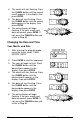
4. The month will start flashing. Press
the CHANGE button until the correct
month appears in the display, then
press ENTER.
5. The date will start flashing. Press
the CHANGE button until the correct
date appears in the display, then
press ENTER.
6. The entire display will begin
flashing. If the year, month and
date are correct, press ENTER. If
not, press the CHANGE button and
return to Step #3.
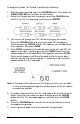
Changing the Date and Time
Year, Month, and Date
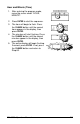
1. After entering the program mode,
move the cursor under “YEAR,
MONTH, DATE".
2. Press ENTER to start the sequence.
3. The year will begin to flash. Press
the CHANGE button until the
desired year appears in the
display, then press ENTER.
4. The month will start flashing. Press
the CHANGE button until the
desired month appears in the
display, then press ENTER.
5. The date will start flashing. Press
the CHANGE button until the
desired date appears in the
display, then press ENTER.
6. The entire display will begin
flashing. If the year, month and
date are correct, press ENTER. If
not, press the CHANGE button and
return to Step #3.