
Specifications


Chapter 3 - Commissioning Operation Verification
BreezeNET B 47 System Manual
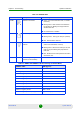
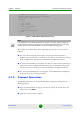
Table 3-5: RB-ODU LEDs
Name Description Functionality
W-LINK Wireless Link Indicator
Green - Unit is associated with a BU, no wireless
link activity
Blinking Green - Data received or transmitted on
the wireless link. Blinking rate is proportional to
wireless traffic rate
Off - Wireless link is disabled
Status Self-test and power indicator
Green - Power is available and self-test passed.
Blinking Amber - Testing (not ready for operation)
Red - Self-test failed - fatal error
ETH Ethernet activity/ connectivity
indicator
Green - Ethernet link between the indoor and
outdoor units is detected, no activity
Blinking Green - Ethernet connectivity is OK, with
traffic on the port. Blinking rate proportional to
traffic rate.
Red - No Ethernet connectivity between the indoor
and outdoor units.
SNR BAR Received signal strength
Indicator (In Normal Mode)
See
Table 3-6 for details
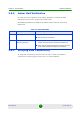
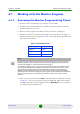
Table 3-6: RB/BU-ODU SNR Bar LED Functionality (In Normal Mode)
SNR Bar LEDs SNR (typical)
LED 1 (red) is On Signal is too low (SNR < 4 dB)
LED 2 (green) is On SNR > 4 dB
LEDs 2 to 3 (green) are On SNR > 8 dB
LEDs 2 to 4 (green) are On SNR > 13 dB
LEDs 2 to 5 (green) are On SNR > 19 dB
LEDs 2 to 6 (green) are On SNR > 26 dB
LEDs 2 to 7 (green) are On SNR > 31 dB
LEDs 2 to 8 (green) are On SNR > 38 dB
LEDs 2 to 9 (green) are On SNR > 44 dB
LEDs 2 to 9 (green) and 10 (orange) are On Signal is too high (SNR > 50 dB)