
User`s guide


DISTRIBUTION AMPLIFIERS
6
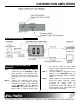
APPLICATION DIAGRAM 5
INSTALLING YOUR DISTRIBUTION
AMPLIFIER 6
Step 1. Connect the 9V 500-mA AC adapter’s
output plug to the DA1906X’s power
input connector - 2.5 mm DC Jack.
Verify that a red LED is displayed in the
top right corner of the unit on the front
panel.
Step 2. Remove the protective port covers.
Connect the video output from the
computer to computer input connector
on the DA1906X using the provided
CB3703MR-3 feet input VGA cable. If a
longer cable is required, please make
sure that the cable has video signal
through coaxial component and that it is
not excessively long.
Step 3. Connect monitors or projectors to the
outputs of the DA1906SX using the
appropriate VGA type cables or adapter
cables.
Step 4. Check position of Termination Switch.
Ensure the proper setting by closely
examining the image quality as
described in section 4.3. An
unterminated image will appear too
bright and may cause colors to blur and
text to appear unreadable.