
User Manual






62 MaxCommunicator Manual
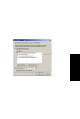
You can enter up to 10 phone numbers in the Caller ID
Verification fields. For local numbers, use 7 digits
(5555555). For long distance numbers, use 10 digits—area
code + local number.
Note: If you enter no numbers in the Caller ID Verification
fields and ONA is enabled, ONA is made available to
every caller.
Using a Password
You can use a Caller ID Verification field to enter a password
number such as “5555” so that a caller who knows this
password can use ONA to find you, regardless of where they
are calling from. Tell the caller to dial 1 during your personal
greeting and then enter the password.
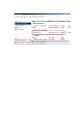
5. Enter the Forwarding Numbers to be used b y the system to
find you when ONA is active. You can set up to four different
numbers—extensions or outside numbers. For outside
numbers, use the drop-down list to select the trunk access
code you want to use. Specify whether the number is an
extension or outside number and if a password is required.
When ONA is active, the system dials the forwarding
number(s) in the order from Forwarding Number 1 through
Forwarding Number 4. Note that this number order does not
correspond to the Schedule order—for example, Forwarding
Number 2 is not used first during Schedule Number 2.
Note: If your system administrator has not configured your
extension to require you to enter your extension
password when answering an ONA call, then a call
forwarded via ONA that is picked up by a voice mail box,
fax machine, or answering machine will connect, and
will not try any subsequent Forwarding Numbers.
Therefore, if you want ONA to use such an option as a
last resort, it should be Forwarding Number 4.
You can set the ONA ring duration from 5 to 45 seconds using
the Ring drop-down lists. Default value is 20 seconds. The system
will ring the ONA target during the specified time limit. If the ring
time exceeds 30 seconds, the system will play a phrase every 15
seconds (playing time is included in ring time).