
User manual






User Manual of Hikvision iVMS-4200 v2.0
67
connect them one-to-one correspondence. You can click in the upper-right corner of the
display window to release the connection.
Notes:
Up to 4 video walls can be added to the client software.
The total number of the display windows on the video wall should be no more than 100.
The ranges of the row number and column number are both between 1 and 20.
9.3 Displaying Video on Video Wall
Purpose:
After the settings of the video wall are configured, the video stream from the cameras can be decoded
and displayed on the Video Wall.
Steps:
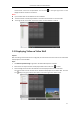
1. Click Back to Operation Page to go back to the Video Wall Operation interface.
2. Select the screen layout mode for the display window and click the icon to save.
3. Click-and-drag the camera from the left-side list to the display window on the video wall.
The video stream from the camera will be decoded and displayed on the Video Wall. Click the
icon and you can get a preview of the video in the lower-right corner of the screen.