
User manual






User Manual of Hikvision iVMS-4200 v2.0
66
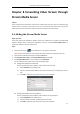
You can add the decoding device in the following ways:
By detecting the online devices, see Section 2.2.1 Adding Online Devices.
By specifying the device IP address, see Section 2.2.2 Adding Devices Manually.
By specifying an IP segment, see Section 2.2.3 Adding Devices by IP Segment.
By IP Server, see Section 2.2.4 Adding Devices by IP Server.
9.2 Configuring Video Wall Settings
Purpose:
After the decoding device is added successfully, the parameters of Video Wall need to configured for
video display.
Steps:
1. Open the Video Wall page.
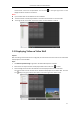
2. Click Enter Video Wall Config to enter the Video Wall Configuration interface.
3. There is a 3*3 video wall on the screen by default. You can add a new video wall if needed.
Perform the following steps to add a new video wall:
1) Click the icon in the toolbar to open the Add Video Wall dialog box.
2) Input the nickname, the number of rows and columns of the video wall.
3) Click Add.
To modify the video wall, select the video wall, and click the icon in the toolbar.
To delete the video wall, select the video wall, and click the icon in the toolbar.
4. Click-and-drag the decoding channel on the left-side list to the display window of video wall, to