
User manual






User Manual of Hikvision iVMS-4200 v2.0
33
1. Open the Record Schedule page.
2. Select the camera from the Camera Group list.
3. Check the checkbox Storage Server to enable recording on storage server.
4. Select the storage server from the drop-down list.
5. Select the record schedule template from the drop-down list.
If you need to edit or customize the template, see Configuring Record Schedule Template.
6. Click Advanced Settings to set the pre-record time, post-record time and video expired time.
7. Click Save to save the settings.
3.2 Remote Playback
Purpose:
The record files stored on the local device or the storage server can be searched by custom view,
camera or triggering event, and then can be played back remotely.
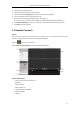
Click the icon on the control panel,
or click View->Remote Playback to open the Remote Playback page.
Remote Playback Page
1 View List, Camera List and Event List
2 Calendar
3 Search Options
4 Search Result List
5 Display Window of Playback
6 Playback Toolbar
7 Timeline