
Operating instructions

6-EN
Operation
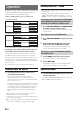
By using this adapter, an iPod or iPod mini is controlled from
an Alpine Ai-NET head unit. The following table shows
which head units can be used for this purpose.
To customers outside Europe
* Hereafter referred to as the CD head unit.
For operation using an Alpine Ai-NET head unit sold as of
January 2005, refer to the head unit’s Owner’s Manual.
All of the iPod’s buttons are disabled when connected to
this adapter. Perform the operation from the head unit.
Operation of the iPod from the Ai-NET head units shown in
the table above, closely follows the MP3 compatible CD
changer operation. For details, refer to the Owner’s Manual
of the head unit.
For each function, refer to the iPod’s documentation.
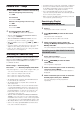
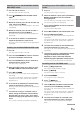
Turning Power On and Off
1
The iPod power turns on as soon as it is
connected to this adapter.
As soon as the iPod is connected, power is
automatically turned on as long as the vehicle’s
ignition is ON or in ACC mode. The head unit’s power
does not have to be on.
The iPod’s power can be turned OFF after removing the
iPod from the adapter. When the iPod is left connected
to the adapter, power is automatically turned off when
the vehicle’s ignition key is turned OFF. (The iPod is
paused and goes into sleep mode about 2 minutes
later.)
• While the iPod is connected to the adapter, the power
cannot be turned on or off from the iPod.
• “OK to disconnect” is shown in the iPod’s display while it
is connected to the adapter.
• While connected to the adapter, the iPod is charged as long
as the vehicle’s ignition key is turned to ACC or ON.
(Ai-NET compatible head unit sold as of January 2004)
Recalling the iPod™ mode
• The iPod mode is displayed in the same way as the CD
changer mode.
• If using the iPod with a changer, the Versatile Link
Terminal (KCA-410C) must be used. In this case, press
BAND to select the changer mode applicable to the iPod.
Controlling from the CD head unit/CDA-W560E/
CDA-W560EG/MDA-W905E/INA-N333RS/INA-
N333RRS/CVA-1004R/CVA-1004RR models
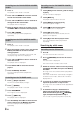
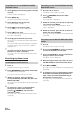
1
Press SOURCE/POWER or SOURCE/PWR
to switch to the CD changer mode.
The iPod is controllable from the head unit in the CD
changer mode.
Controlling from the IVA-D900R model
1
Press SOURCE/POWER to display the main
menu.
2
Turn the Rotary encoder to select “CD
CHG,” then press the Rotary encoder.
The display changes to the CD changer mode
screen, then the iPod can be controlled.
Controlling from the IVA-D300R/IVA-D300RB/
IVA-D300E models
1
Touch [SRC] on the main source screen.
The source selection screen is displayed.
2
Touch [CD CHG].
The display changes to the CD changer mode
screen, then the iPod can be controlled.
Adjusting Volume
1
Turn the Rotary encoder until the desired
sound is obtained.
• If the INA-N333RS/INA-N333RRS models are connected,
turn the MODE (Audio Control) knob.
INA-N333RS
INA-N333RRS
IVA-D300R
IVA-D300RB
IVA-D900R
CVA-1004R
CVA-1004RR
CDA-9835R*
CDA-9833R*
CDA-9831R*
CDA-9830R*
CDA-9812RB*
CDA-9812RR*
NAVI/CD
Head Unit
A/V Head Unit
CD Head Unit
To customers in Europe
CDA-W560E
CDA-W560EG
MDA-W905E
IVA-D300E
IVA-D900R
CVA-1004R
CDA-9835*
CDA-9833*
CDA-9831 *
CDA-9830*
CDA-9827*
CDA-9826*
CDA-9825*
CD/CST
Head Unit
MD/CD Head Unit
A/V Head Unit
CD Head Unit