
Operating instructions

5-EN
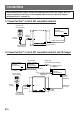
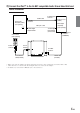
3) Connect the iPod™ to the Ai-NET compatible Audio Visual Head Unit and
Audio Processor
• While connected to the adapter, the iPod is charged as long as the vehicle’s ignition key is turned to ACC or ON.
• “OK to disconnect” is shown in the iPod’s display while it is connected to the adapter.
•For details, refer to the Owner’s Manual of the connected devices.
Ai-NET
EQ/DIVNORM
Audio Visual
Head Unit
(Ai-NET)
(Sold separately)
iPod, iPod mini
(Sold separately)
To Dock
connector
Fibre optic cable
Ai-NET cable
iPod connection
cable (Included)
To Ai-NET
connector
To Fibre digital
Output terminal
To Ai-NET input
connector
Ai-NET cable
(Included)
Audio Processor
(AI-NET)
(
Fibre
Digital
compatible)
(Sold separately)
To Fibre digital
Input terminal
(for head unit)
To iPod
terminal
To Ai-NET
connector
To Ai-NET Input
connector
(CHANGER)