
Troubleshooting Guide
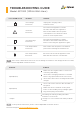

Icon on LCD screen Problem Solution
Over-Charge
Protection
Unplug the charging cable,
restart the unit.
Disconnect all appliances, restart
the unit, and add each appliance
back in turn. Make sure the power
consumption is less than the rated
power of each output outlet.
Disconnect all appliances, charge
the unit to 80% and restart the unit
before connecting the appliances again.
Turn off the unit and place it in warmer
place before turning the unit back on.
Customer Support: service.pps@alpha-ess.com
Disconnect all electrical appliances and
wait until the unit has cooled down.
Overload
Protection
Over-Discharge
Protection
Low-Temperature
Protection
Over-Temperature
Protection
Problem Solution
Input(AC/DC)
Input(Solar)
Output
If the error is indacated on the LCD screen during use and does not disappear after a restart,
please contact AlphaESS Customer Service.
TIP
If the probem still resists, please contact AlphaESS Customer Service.
TIP
Make sure the original cable is connected
correcting and firmly.
Check if the charging indicator is on and if
there is any input watts in the LCD screen.
Check if the unit can be recharged via DC/AC
charger.
Use a soft cloth to remove dust and dirt on
the panel.
Make sure there is shadow on the panel.
Test it on the midday strong sunlight again.
Plug and unplug several times.
Resetting the unit by holding the INFO
button for 15 seconds.
Charge it to 100% and check if this problem
resists.
TROUBLESHOOTING GUIDE
Model: AP1000 (1036.8 Watt-Hour)