
Troubleshooting guide





36
3.0 Power Supply, continued
745-573-B0-001 REV. A
3.4 Maintenance, continued
Cable Company:___________________________________________________
Inspection Date:________________ Location:_________________________
Technician:____________________ Model/Serial#:____________________
Visual Problem and Fix:__________________________________
Inspection Comments:_______________________________________
Battery Weak LEDs: String 1: ON / OFF String 2: ON / OFF
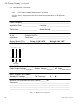
LED Display: Mark the illuminated LEDs on the diagram below:
DVM (RMS Voltmeter) Readings
Cable Output Voltage:________ Battery Voltage:________ AC Amps:________
Test Points Test Points Clamp on Probe
Press “Inverter Test” button.
Standby AC voltage:_______ Fan Running? YN
Remove Dust and Moisture from Cabinet:______OK
Comments:_______________________________________________________
________________________________________________________________
________________________________________________________________
________________________________________________________________
Input Battery Load
BatteryInverter Comm
Output ON
Use this form in conjunction with the maintenance procedures in the previous
section.
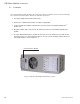
Fig. 3-13, Maintenance Log Sheet
3.4.2 CPR Power Supply Maintenance Log Sheet