Laptop User Manual
Manuals
Brands
Alienware Manuals
Laptop
M14XR2
41
42
43
44
45
46
47
48
49
50
46
Wireless Mini-Card(s)
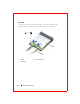
Procedure
1
Disconnect the antenn
a cables from the connectors on th
e mini-card.
2
Remove the screw that secur
es
the mini-card to the system board.
1
scr
ew
2
antenna cables (2)
3
Mini-Card
2
1
3
1
...
...
42
43
44
45
46
...
...
104