
DVD/CD Flash Copy Tower Manual







www.aleratec.com
20
Using the DVD/CD Flash Copy Tower
Function Overview: 3. Information
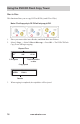
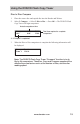
Memory Card Information
1. Insert a Memory Card into the DVD/CD Flash Copy Tower.
2. Select 3.Information, → Select 1.M-Cardinfo → Press OK → The DVD/CD
Flash Copy Tower will show the information of this Memory Card.
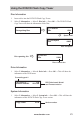
USB Information
1. Insert a USB ash drive into the DVD/CD Flash Copy Tower.
2. Select 3.Information, → Select 2.USBinfo → Press OK → The DVD/CD Flash
Copy Tower will show the information of this USB ash drive.
Total le Qty:
82
Total file number on the
Memory Card
MS 30.8MB
Used 28.4MB
Total size of Memory Card
Used content in Memory Card
Total le Qty:
890
Total file number on the USB drive
USB Disc 820MB
Used 702MB
Total size of USB drive
Used content of USB drive