
DVD/CD Flash Copy Tower Manual







www.aleratec.com
19
Using the DVD/CD Flash Copy Tower
Disc to Disc Compare
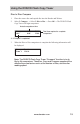
1. Place the source disc and copied disc into the Reader and Writers.
2. Select 2.Compare, → Select 3.DisctoDisc → Press OK → The DVD/CD Flash
Copy Tower will begin comparison.
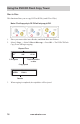
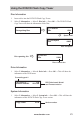
3. When the Disc to Disc comparison is complete the following information will
be displayed:
Note: The DVD/CD Flash Copy Tower “Compare” function is to do
file by file comparison. Therefore, Copy and Compare speeds will be
affected by some factors such as the number of files, and the disc
reading speed.
Compare Result
Pass 1 Fail 0
Compare 0:40 73:56
19% 0.0X 17:22
Actual comparison time
% “Compare” completed
Total time required to complete
comparison