
User`s manual





Alcorn McBride Digital Video Machine DVM-7400 User’s
Manual Rev 1.5
88
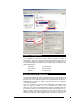
the items just described. The DVM7400 will need to be power cycled to complete
the configuration.
Repeat these steps for all the devices you wish to connect to the network. Be
sure all devices have a unique IP address or your network will not work. The port
connections do not matter and can be changed at any time with out having to
readdress any of the devices.
Try It Out
Now that the hardware is setup, the next step is to begin to communicate with all
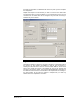
the devices you have added. Use AMIterm to test the port connections by
selecting the Ethernet button under the “Communication Method” window show
above. Then request the version of the software by going to the “General” tab
and click on the “Version” button. The command will be displayed at the bottom of
the AMITerm window and the connected device will respond with the message in
the same window. At this point the network is complete and you need only
address the unit to complete the connection.