
User`s manual





Alcorn McBride Digital Video Machine DVM-7400 User’s Manual Rev 1.5
87
Device Configuration
The configuration of the Alcorn devices should be setup by default to
192.168.0.254. That is all of them will have the same address so they must be
reconfigured. If changes are needed or if parameters need to be verified, then go
thru the following steps to understand how to configure the port parameters. The
default parameters are:
IP address: 192.168.000.254
Subnet Mask: 255.255.255.000
Gateway: 192.168.000.001
Setting Device IP Addresses
The default IP address of most Alcorn McBride equipment is 192.168.0.254. This
may need to be changed to work in your network. In this example, we will set all
the other units on the network according to the configuration requirements. i.e.
DVM7400/E-1 is 192.168.0.101, AM4/E is 192.168.0.102 and so on. Remember
to make an address map.
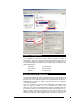
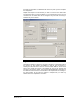
Connect to the serial port of the first device (DVM7400/E in this example) and
open the AMITerm software. (You can download this program from
www.alcorn.com.) Click on the Network tab and under the Configuration Box click
the Set button. Next go to the IP field and edit the last number changing it to 101.
Click the IP button and observe the message in the box at the bottom left of the
AMITerm window. The receive response must be R<0D> to verify the new
address was understood. See the diagram below for the locations and function of