
User`s manual




Alcorn McBride Digital Video Machine DVM-7400 User’s
Manual Rev 1.5
82
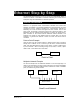
Ethernet Step by Step
This Application Note will show you how to connect your DVM7400/E, AM4/E or
V16Pro to a network. Some basics of Ethernet networking are covered, and an
example of using the DVM7400/E in a network is provided.
Network Architecture
Ethernet is a high-speed serial communication standard that involves both
hardware and software. The hardware maintains the electrical integrity of all the
connections and the software maintains the communication channels by
addressing the correct connection throughout the entire network. From a user
point of view, the process of connecting a device to a network is simple. In this
application note, two examples will be examined. The first is the simple point-to-
point connection of two devices without additional network hardware. This
example is the similar to using RS232 ports and a serial cable. The second
example is a general local network in which more than two devices will be
connected.
Point-to-Point Example
Here we have a PC that connects directly to another device. When connecting
directly from a notebook or PC to a device you will need a crossover Ethernet
cable. This cable eliminates the need for a hub, switch, or router to make a point
to point connection. When connecting through a hub, switch, or router, a patch
cable is used. There will be more on this later.
Multipoint Network Example
The second example will use additional hardware to form the beginnings of a
network. You will be able to connect as many devices as you have ports available
on the switch. By connecting additional hubs, switches and router to available
ports, the network can grow as needed.
Ethernet Switch
PC Device 1 Device 2
Small Local Network
PC Device
Point to Point