
User`s manual



Alcorn McBride Digital Video Machine DVM-7400 User’s Manual Rev 1.5
65
12
SYMBOLS:
SWITCH
12
12
1N4148
12
12
12
12
12
12
12
12
12
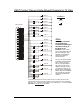
DB37 Contact Closure Diode Network Diagram for 15 Clips
Note:
The 37pin connector
on the diagram is
inverted from what you
see when looking at
the back of our
product.
This is so that
you can see what it will look
like when making a cable
assembly. Remember to
have the I/O setting to
Contact Closure.
You may use this as a guide
for building a diode network,
but it is only a reference.
We are not responsible for
any obvious errors in the
diagram. Use logic to verify
your setup is correct. If you
find errors with this diagram,
please notify Alcorn McBride.
You can help us help other
customers with the same
question.
12
12
12
12
12
12
12
12
12
12
12
12
12
12
12
12
12
2
21
1
20
4
23
3
22
6
25
5
24
8
27
7
26
10
29
9
28
12
31
11
30
14
33
13
32
16
35
15
34
18
37
17
36
19
Clip 3
12
Clip 1
12
Clip 2
12
Clip 4
12
Clip 5
12
Clip 6
12
Clip 7
12
Clip 8
Clip 9
12
Clip 10
12
Clip 11
12
Clip 12
12
Clip 15
12
Clip 14
12
Clip 13
12
12
Ground
I/O connector
12
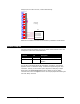
If you don’t want to wire this circuit yourself, we have a cheap, discrete control
breakout-board that lets you directly select all 15 files and the control contacts like
Play, Stop, etc… without touching a diode or your soldering iron. Look for the Input
Expander at
www.alcorn.com for details.