
User`s manual



Alcorn McBride Digital Video Machine DVM-7400 User’s Manual Rev 1.5
64
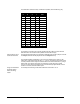
The table below shows the binary combinations possible, and what file they play:
8 4 2 1 File
Off Off Off Off None
Off Off Off On 1
Off Off On Off 2
Off Off On On 3
Off On Off Off 4
Off On Off On 5
Off On On Off 6
Off On On On 7
On Off Off Off 8
On Off Off On 9
On Off On Off 10
On Off On On 11
On On Off Off 12
On On Off On 13
On On On Off 14
On On On On 15
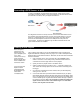
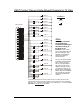
For example, connecting pins 8 and 27 together with the Voltage / Contact Closure
DIP switch set in the contact closure position will cause file 8 to play.
The loop input is read
at the start of the file.
The file will be looped if the loop command is asserted when the file is played. If the file
is a Playlist, all tracks will be played and then the Playlist will loop.
The simplest possible configuration is to connect four buttons to the unit’s four file
select lines. These buttons will play files 1, 2, 4 and 8. (The missing file numbers need
not exist.) Sixteen buttons may be connected without an external controller, by using a
diode matrix. One side of each button is connected to a wire that goes to signal
ground. The other sides of the buttons are connected through signal diodes, such as
a 1N914 or 1N4148, to the file select inputs.
Using a terminal block
to hold the diodes
makes the wiring
neater.
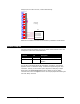
For example, the following circuit allows switches to select files 1 to 15: