
User`s manual



Alcorn McBride Digital Video Machine DVM-7400 User’s Manual Rev 1.5
58
Comments
Both the Approx Location and Comments field are solely for the purpose of describing
the location and function of each GPS point. They are not used by the DVM.
Map Display
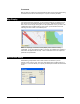
If an Internet connection is present, you can view the location of your GPS point on a
map. Click on the map tab at the bottom of your screen. Select the GPS point you
wish to view on the map my clicking its row in the spreadsheet. Once you click on the
“Update Map” button located at the top of the screen, you should see a red circle
indicating the exact location of the selected point.
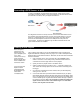
Aside from displaying coordinated, the Map Display is also useful for entering
coordinates. If you click a specific location on the map, the Latitude and Longitude of
that location will appear below the map. These coordinates can then be copied and
pasted into the spreadsheet.
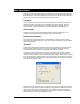
GPS Device Setup
GPS Builder typically detects when a GPS receiver is connected to your PC.
However, if this is not the case, click on the ‘GPS Setup’ button located at the top of
the screen. This screen allows you to specify the COM port and baud rate of the GPS
device.