
User`s manual


Alcorn McBride Digital Video Machine DVM-7400 User’s Manual Rev 1.5
53
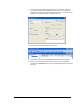
6. If you only want the command to be executed once, just click OK. However, if
you want the command to be repeated (say every hour or every day) you can
specify that in the repeat box on the right side of the screen. For the sake of this
example, we are going to repeat this command every hour.
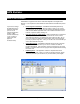
7. Click OK and the event will be added to the schedule.
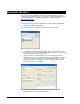
7. In this screen, you are free to Add/Edit/Delete Scheduled events as needed.
8. Once you are finished creating the schedule, all you need to do is Save the
schedule file as schedule.scl and copy it to the Digital Video Machine’s Compact
Flash card.