
User`s manual


Alcorn McBride Digital Video Machine DVM-7400 User’s Manual Rev 1.5
52
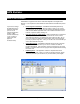
Schedule Builder
For convenience, Alcorn McBride provides a free Windows application for making
schedules using a graphical interface. This program is called Schedule Builder, and it
can be downloaded from the software section the Alcorn McBride website at
http://www.alcorn.com.
Here is a step-by-step guide to get started making schedules with Schedule Builder.
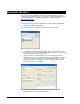
1. Open the Schedule Builder application
2. Select the DVM-7400 in the list of supported devices and click OK.
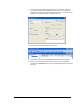
3. The Add/Edit Event window will appear automatically. This is where you select
the event you wish to insert into the schedule. Since “Play Clip” is the event used
to play a video, we will use it for this example.
4. Using the arrows in the ‘parameters’ box, you can select which type of Play
command you wish to use. For example, “By Number” would allow you to enter a
clip number. “By File” would allow you to enter the actual file name. If you are
using the compact flash card that shipped inside your DVM, select ‘By Number’
and enter the number ‘1’ in the field.
5. Select the time and date you wish to execute the command in the Start
Date/Time section on the right side of this screen.