
User`s manual




Alcorn McBride Digital Video Machine DVM-7400 User’s Manual Rev 1.5
44
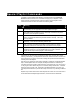
Special Playlist Commands
In addition to regular Digital Video Machine commands listed in the Command
Protocol section, there are a few commands that apply only to Playlists. These
single-character commands further modify the behavior of the Playlists. These
characters and their functions are listed in the following table:
Char Meaning
U Uninterruptible. Causes the Digital Video Machine to ignore the Resume input
and serial Play until the playlist becomes interruptible once again.
I Interruptible. Allows the Resume input or serial Play command to skip to the
next track. This is the power-up default.
S Seamless. Whenever PL commands are located immediately after one
another, the playlist will seamlessly transition between the clips. This is the
power-up default.
G Segmented. In this mode, the playlist will not transition between clips
seamlessly. There will be a brief delay between clips.
W Wait. Unit waits until a Resume (Parallel) or a Play (Ethernet or Serial)
Command received, then continues to the next command in the playlist.
< Loop. Tells the playlist to loop upon completion. The only way to stop the
playlist from looping is to use the Parallel Stop input or Stop command. The
playlist will also stop if another playlist or video is started.
; Comment. Ignore all characters until the next line.
Commands may be entered into the Playlist in either upper or lower case. All text
following a semicolon (;) is interpreted as comments, until the next line in the file. You
may put anything you want in comments, including the special command characters
normally used in the Playlist.
One thing to be cautious of when making a playlist is creating an unintended endless
loop or uninterruptible wait. For example, if a Playlist contains a ‘U’ followed by a
Loop Play command, it doesn’t matter how many more tracks may occur in it, there is
no way to get to them! When using the ‘U’ command, always include an ‘I’ command
before the next Loop Play or W, unless this is the desired behavior. Of course, you
can always terminate the loop or wait with a stop command, or by selecting a different
file.
Playlists may contain references to other Playlists, but as soon as such a reference is
encountered the new Playlist begins execution, and the old one is abandoned.