
User`s manual




Alcorn McBride Digital Video Machine DVM-7400 User’s Manual Rev 1.5
39
Serial Control
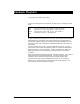
Be sure that the DVM’s
Serial Port Mode DIP
switch is in the Normal
(On) position if you
intend to use RS-232
control.
The Digital Video Machine can be controlled using the male DB-9 RS-232 connector
on the rear panel. If you are interfacing to the DVM with a PC or other type of
controller, you will need to use a straight-through DB-9 Female to DB-9 Female
serial cable. For your convenience, this cable has been included with your DVM.
This serial interface defaults to 9600 baud, no parity, 8 bits per character, and one
stop bit (9600,8,N,1). If you need to use a different baud rate, you can change it
using the Baud Rate command listed in the Command Protocol section.
All serial commands are ASCII based, and are terminated with a carriage return
(hexadecimal value 0x0D). The complete list of supported commands can be found
in the Command Protocol section as well.
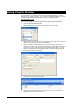
For your convenience, Alcorn McBride distributes an application called AMI
Terminal, which allows you to control the DVM via RS-232 with the click of a button.
This free application can be obtained at
http://www.alcorn.com.