
User`s manual

Alcorn McBride Digital Video Machine DVM-7400 User’s Manual Rev 1.5
36
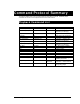
Configuration Command List
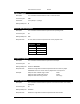
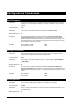
Video Configuration Commands
Description Command Bytes Response Comments
Set Colorspace nVC R n=0(RGB), n=1(YUV)
Get Colorspace VC n n=0(RGB), n=1(YUV)
Set Sync-on-Green nSG R n=0(RGB-HV), n=1(RGsB)
Get Sync-on-Green SG n n=0(RGB-HV), n=1(RGsB)
Set Brightness nnnBN R n=Brightness Level (0-100)
Get Brightness BN nnn n=Brightness Level (0-100)
Set Contrast nnnCO R n=Contrast Level (0-100)
Get Contrast CO nnn n=Contrast Level (0-100)
Set Saturation nnnSA R n=Saturation Level (0-100)
Get Saturation SA nnn n=Saturation Level (0-100)
Set Aspect Ratio nAP R n=0 Æ4:3 Normal
n=1 Æ4:3 PanScan
n=2 Æ4:3 Letterbox
n=3 Æ16:9 Normal
n=4 Æ16:9 Letterbox
n=5 Æ16:9 PanScan
Get Aspect Ratio AP b n = number between 1-5
representing aspect ratio
Set Test Pattern nTP R n=0 Æ Test Pattern Off
n=1 Æ ITU Combination
n=2 Æ Pluge
n=3 Æ SMPTE Bars
n=4 Æ Step/Pulse
n=5 Æ EIA Color Bars
n=6 Æ EBU Color Bars
n=7 Æ EBU Color Bars
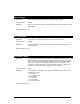
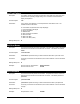
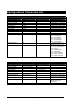
Ethernet Configuration Commands
Description Command Bytes Response Comments
Set IP Address xxx.xxx.xxx.xxxIP R
Set Subnet Mask xxx.xxx.xxx.xxxSM R
Set Gateway xxx.xxx.xxx.xxxGW R
Get IP Address IP xxx.xxx.xxx.xxx
Get Gateway Address GW xxx.xxx.xxx.xxx
Get Subnet Mask SM xxx.xxx.xxx.xxx
Set FTP User Name <Username>US R <Username> = ASCII user
name (up to 32 characters)
Get FTP User Name US <Username>
Set FTP Password <Password>PW R <Password> = ASCII
password (up to 32
characters)
Get FTP Password PW <Password>