
User`s manual

Alcorn McBride Digital Video Machine DVM-7400 User’s Manual Rev 1.5
35
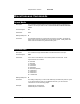
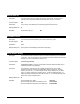
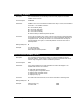
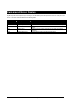
Command Protocol Summary
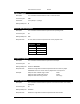
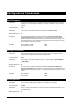
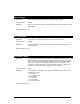
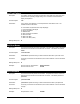
The following tables list all of the commands that are supported by the DVM. Additional playlist
commands can be found in the Playlist Control section of this manual.
Playback Command List
Description Command Bytes Response Comments
Select File (Number) nnnnnSE R n = File number (0-99999)
Select File (Name) ”<filename>”SE R <filename> = filename with
extension (ie. Test.mpg)
Play PL R
Plays selected file
Loop Play LP R Plays and loops selected file
Play File (Number) nnnnnPL R n = File number (0-99999)
Play File (Name) ”<filename>”PL R <filename> = filename with
extension (ie. Test.mpg)
Loop File (Number) nnnnnLP R n = File number (0-99999)
Loop File (Name) ”<filename>”LP R <filename> = filename with
extension (ie. Test.mpg)
Play Next nnnnnPN R n = File number (0-99999)
Loop Next nnnnnLN R n = File number (0-99999)
Still ST R Picture remains
Pause PA R Picture goes black
Stop RJ R Picture remains
Audio Control (Mute) nAD R n=0(Mute), n=1(Unmute)
Audio Control (Volume) nnn%AD R nnn = volume level from 0-100
Video Control nVD R n=0(Black), 1=(Image)
Active Mode Request ?P P0n n=1(Stopped), 4(Playing),
5(Stilled), 6(Paused)
Chapter Request ?C nnnnn
<filename>
nnnnn = file number
<filename> = ASCII filename
Frame Request ?F nnnnnnn nnnnnnn = current video frame
of clip being played