
User`s manual

Alcorn McBride Digital Video Machine DVM-7400 User’s Manual Rev 1.5
30
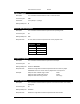
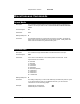
Set Test Pattern
Description: The DVM is capable of generating several built-in test patterns for diagnosing video
problems and/or optimizing display settings. This command causes the DVM to
display those patterns.
Command Bytes: nTP
Parameters: n is a numeric value between 0-7 that represents the Test Pattern mode. The
available modes are as follows:
0 = Test Pattern Off (Normal video output displayed)
1 = ITU Combination Test Signal
2 = Pluge Test Pattern
3 = SMPTE Bars
4 = Step and Pulse Test Pattern
5 = EIA Color Bars
6 = EBU Color Bars
7 = EBU Color Bars (100%)
Message Response: R
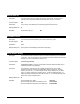
Set User Name
Description: This command sets the user name of the DVM. The user name is used to access the
DVM via the FTP interface over the Ethernet connection. The default user name is
admin.
Command Bytes: <username>US
Parameters: <username> represents a string of ASCII characters that make up the user name.
Comments: This string of characters is case-sensitive, and must be between 4 and 32 characters
in length.
Message Response: R
Examples: Set user name to “Administrator”: AdministratorUS
Set user name to “Fred”: FredUS
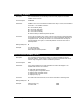
Set Password
Description: This command sets the password of the DVM. The password is used to access the
DVM via the FTP interface over the Ethernet connection. The default password is
password.
Command Bytes: <password>PW
Parameters: <password> represents a string of ASCII characters that make up the password
Comments: This string of characters is case-sensitive, and must be between 4 and 32 characters
in length.
Message Response: R
Examples: Set password to “1234”: 1234PW