
User`s manual

Alcorn McBride Digital Video Machine DVM-7400 User’s Manual Rev 1.5
29
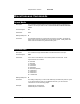
Set Contrast
Description: This command configures the Contrast of the DVM’s video outputs.
Command Bytes: nnnCO
Parameters: nnn is a numeric value between 0-100 that represents the Contrast setting. 50 is the
default setting.
Message Response: R
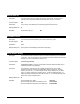
Set Saturation
Description: This command configures the Saturation of the DVM’s video outputs.
Command Bytes: nnnSA
Parameters: nnn is a numeric value between 0-100 that represents the Saturation setting. 50 is
the default setting.
Message Response: R
Set Aspect Ratio
Description: This command configures the Aspect Ratio of the DVM’s video outputs. Normally, the
DVM will take the source MPEG video material and stretch it to the size of the video
output. This means that no matter what the aspect ratio of your source material is
(4:3 or 16:9), it will fill the entire display (whether it’s a 4:3 or 16:9 display). This
command is used for cases where you don’t want this to happen. (ie. Playing 16:9
material on a 4:3 display without stretching the picture vertically)
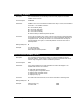
Command Bytes: nAP
Parameters: n is a numeric value between 0-5 that represents the Aspect Ratio setting. These
settings are as follows:
0 = 4:3 Normal
1 = 4:3 Pan-and-Scan
2 = 4:3 Letterbox
3 = 16:9 Normal
4 = 16:9 Letterbox
5 = 16:9 Pan-and-Scan
Message Response: R