
User`s manual


Alcorn McBride Digital Video Machine DVM-7400 User’s Manual Rev 1.5
18
Professional Video Option (/P)
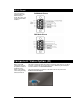
The S/PDIF output is
a standard IEC-958
signal containing
either Stereo (2-
channel) or Dolby
Digital AC3 (5.1
Channel) audio.
The sync output is
NOT a passive
connection to the sync
input. It actually
generates a
Composite sync
signal.
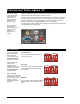
When the Digital Video Machine is ordered with the Professional Video option, it will
provide a component video output on an HD15 connector.
In addition, this option provides the DVM with the ability to synchronize to an external
video sync source using the sync input. The sync output can be used to feed video
sync into other devices, such as other DVM’s. For more information on the sync
features of the DVM, see the Synchronization section in this manual.
This option also provides a digital audio RCA jack for outputting S/PDIF Stereo Audio
or Dolby Digital 5.1 Surround Sound.
DIP Switches
For more information
about configuring the
DVM for external
sync, be sure to read
the Synchronization
section of this manual.
The colorspace DIP-
switch can be
overridden with
software using remote
commands. See the
Command Protocol
section for details.
When using RGB
colorspace, you have the
option to enable or disable
Sync-On-Green. This
setting can only be
changed using remote
commands.
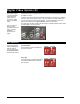
75Ω Termination
The first switch is used to terminate the
sync input connector.
Sync Type
The second switch configures the DVM to
receive either Blackburst or Composite
Sync (C-Sync).
RGB/YUV
The third switch selects between RGB and
YUV colorspace on the component video
output.
C-S
y
nc
Blackburst
YUV
RGB
75Ω On
75Ω Of
f