
User`s manual





Alcorn McBride Digital Video Machine DVM-7400 User’s Manual Rev 1.5
13
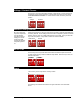
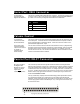
Voltage / Contact Closure
The first key in the 4-key bank selects between voltage inputs or contact closures for
the discrete controls. More information on these inputs may be found in the section
entitled Rear Panel Connectors. For contact closure mode, set this key to the ON
position.
Restore Factory Defaults
Be sure to return this
key to the ON position
once the defaults
have been restored.
Failing to do so will
result in the DVM
restoring the defaults
every time it powers
on.
Setting the second key in the 4-key bank causes the DVM to reset all stored settings to
the factory defaults. These settings include the video configuration, password, network
address, and any other non-volatile settings stored on the DVM. Once you switch the
key to the OFF position, it only takes a moment to reset the defaults.
NTSC / PAL
The third key in the 4-key bank determines whether the DVM’s output format is PAL
or NTSC. When the key is ON, the DVM will output NTSC. When the key is OFF, the
DVM will output PAL.
PAL
NTSC
Spare
The fourth key of the 4-key bank is currently unused.
The following two switches are located to the right of the bank of four described
above.
Contacts
Voltage
Restore Def. Normal