
User`s guide






58 DVMHD.INI
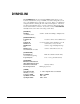
DVMHD.INI
The DVMHD.INI file may be found in the MEDIA folder (where you are
located by default when you log in via FTP)
. It contains settings that you can
use to setup default behavior of the unit on power-up. Below, you will find an
example of this file containing all of the entries and descriptions. All of these
are changed automatically when you send a command to change them via the
remote control interfaces. However, if you wish, you may edit DVMHD.INI
manually and reboot the unit for the settings to take effect.
[GENERAL]
UnitID=1 unit ID – useful when talking to multiple units
over UDP broadcast
[GEOGRAPHICAL]
Longitude=81 needed for sunrise sunset calculations to
work
Latitude=28 needed for sunrise sunset calculations to work
TimeZone=-5 set this when you set your time
DSTEnable=1 set this to support Daylight Savings
Time
DSTType=usa set this to values like usa, aus, utc.
Check UDP table for values
[SCHEDULER]
BootUpDelay=0 Make the scheduler wait this many
seconds before beginning.
LogActivity=No Set to 1 to Log scheduler activity
[NETWORK]
IPAddress=192.168.0.254
SubnetMask=255.255.255.0
GWAddress=192.168.0.1 Gateway Address
Password=password FTP login password
[VIDEO]
VideoMode=1080I See Video Output Format in Command
Summary for strings
Colorspace=RGB RGB or YPBPR
SyncOnGreen=YES
YES or NO
SyncInput=NTSC
NTSC or PAL