
User`s guide

32 Scheduler
Scheduler
The DVMHD has a down-to-the-minute scheduler based upon its internal real
time clock. According to the time of day and date of year, the DVMHD can
start a video or playlist at 3pm on January 1
st
2005, for example. This
functionality is built into a feature called the Scheduler.
The Basic Idea for Commands
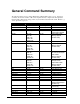
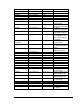
All commands available to the Serial, UDP, and Playlist interface are available
to the Scheduler interface as well. Though there is a list of example commands
in the event table later in this section, please see the
General Command
Summary
section for a complete table of commands. The following section
describes how you format these commands for use in the scheduler.
File Format / Tutorial
The Scheduler uses a text file loaded in the SCHEDULES folder of the
DVMHD. The text file can be edited in a text editor, like notepad.
A schedule is composed of a list of events. An event is some sort of action that
must happen at a given time, whether it is changing to a new video or changing
the font.
An event has a variety of parameters that can be applied to it, in order to
customize the DVMHD’s control for your show. In order to understand how
you define an event in the DVMHD, let’s take this simplest example and build it
to the most feature-rich example.
Example 1: T:13:46 D:01/1/2000 E:COMMAND 1:1PL
An event exists on one line. It is made up of several fields. Example 1 shows
the minimum number of fields you need to define an event, which are an Event,
a Start Time, the first data field, and a Start Date. Each field begins with a
delimiter.
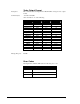
Here is a table of delimiters for your reference:
Delimiter Field
T:
Starting time (hh:mm) (military time)
D:
Starting date (mm/dd/yy or mm/dd/yyyy . You can use periods,
slashes, or dashes to separate dates)
I:
Ending time (hh:mm) (military time)
A:
Ending date (mm/dd/yy or mm/dd/yyyy . You can use periods,
slashes, or dashes to separate dates)
E:
Event – always COMMAND for the DVMHD