
User`s guide


Playlists 29
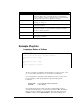
Char Meaning
AND
All commands AND’ed together will be implemented at the same time.
Without the AND operator, a command will not be executed until the
previous command is completed. The playlist will go no further until all
commands in this set have been completed. See Examples
AFTER[dd:hh:mm:ss]
Make the following command wait the time defined in the brackets before
executing. See Examples
WAIT
Insert this to make the playlist wait on the current set until it has received
another play command.
<
Repeat entire Playlist. The only way to stop the Playlist from looping is to
use the Stop command, or to start another file. Anything in the Playlist
after the ‘<’ character is ignored.
;
Comment - everything after the semicolon on that line is ignored
Delimiters
Commands (,), white space (spaces and tabs), carriage returns (and line
feeds) separate commands.
Example Playlists
Looping a Series of Videos
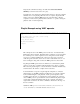
; ply00100.lst
; Play a series of test clips – Loop when completed
; Play Video #1 (vid00001.mpg)
1PL
; Play Video #2 (vid00002.mpg)
2PL
; Loop to beginning of playlist
<
The above example is probably the simplest playlist you could ever write, so lets
go over it in detail to understand how to use it and how it will behave.
To use this playlist, we must first Search and Play it (just as we would a video).
For this example, we will start this playlist using the following Serial
Commands:
100SE <CR> Å Search Playlist #100 (ply00100.lst)
PL <CR> Å Start Playlist
Now that the playlist has been started, the first command will be executed.
Scrolling down the playlist, we see that the first command is 1PL. The Playlist
Engine passes this command on to the EXACT same engine that analyzes all
DVMHD commands (the Command Engine). The Command Engine then