
User`s guide


28 Playlists
Playlists
Playlists provide a mechanism for the DVMHD to automatically execute a series
of commands in a predefined sequence. Playlists often allow the unit to be used
to perform complex functions that would normally require an external
controller. Playlists can perform functions as simple as cycling through a list of
videos, or more complex functions like launching schedules or other playlists.
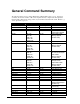
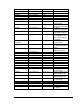
All commands available to the Serial, Ethernet, and scheduler interfaces are
available to the playlist interface. For a list of all the commands at your
disposal, see the General Command Summary section.
You search and execute playlists just like you search and play video files.
However, unlike a video file, commands in the playlists can control all aspects
of the DVMHD. For example, if you were so inclined, you could have a playlist
change videos modes, send serial messages, change the IP address, etc. Once
you gain an understanding of how the playlist feature functions, the
combinations of complex tasks you can perform within the DVMHD are
endless.
Commands may be entered into the Playlist in either upper or lower case. All
text following a semicolon (;) is interpreted as comments, until the next carriage
return. You may put anything you want in comments, including the special
command characters normally used in the Playlist. Playlist files are stored in
the PLAYLISTS directory.
Extra Commands
The Playlist engines support all the control commands that are available to the
other interfaces like Serial, UDP and Scheduler. They actually have the same
format. For a table with a list of these, see the General Command Summary
section. In addition, there are some additional operators available to the Playlist
interface, since it has some special functionality the other interfaces don’t have.