
User`s guide


26 General Command Summary
General Command Summary
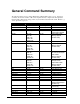
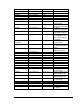
The following table shows the complete Digital Video Machine HD control protocol. Using these
commands, an external controller or PC can accomplish extremely complex tasks. Throughout the
following table, <CR> means carriage return, a byte with the hexadecimal value of 0D. Brackets, [ ],
denote optional message bytes.
Description Command Bytes Response Comments
Firmware Version Request ?V<CR> Version string<CR>
Current File ?C<CR> Filename<CR> Get name of current file.
Current Status ?P<CR> State<CR> State = Playing, Stopped, etc.
Play PL<CR> R<CR> Plays currently selected file.
Resumes if video is still/paused.
Play File nPL<CR>
nnPL<CR>
nnnPL<CR>
nnnnPL<CR>
nnnnnPL<CR>
R<CR> Only file number 0-99999
addressing is supported.
(not frames or time).
Play and Loop LP<CR> R<CR> Loops currently selected file.
Play and Loop File nLP<CR>
nnLP<CR>
nnnLP<CR>
nnnnLP<CR>
nnnnnLP<CR>
R<CR> Only file number 0-99999
addressing is supported.
(not frames or time).
Play Next nPN<CR>
nnPN<CR>
nnnPN<CR>
nnnnPN<CR>
nnnnnPN<CR>
R<CR> Plays the file after the currently
active video is finished. Only file
number 0-99999
addressing is supported.
(not frames or time).
Search File nSE<CR>
nnSE<CR>
nnnSE<CR>
nnnnSE<CR>
nnnnnSE<CR>
R<CR> Preloads and Selects specified file
and displays 1
st
frame.
Only file number 0-99999
addressing is supported.
(not frames or time).
Pause PA<CR> R<CR> Black screen
Still ST<CR> R<CR> Picture remains on screen
Stop RJ<CR> R<CR> Picture remains on screen
Audio Control nAD<CR> R<CR> n=0(Mute), 1(Unmute)
Video Control nVD<CR> R<CR> n=0(Mute), 1(Unmute)
Reset Video Channel RV R<CR> Resets video decoder card
Reset System XX<CR> R<CR> Reboots entire system
Configuration
Video Mode “<VideoMode>”VD<CR
>
R<CR>
See Video Output Format in
detailed command summary for
Video Mode strings
Video Colorspace nVC<CR> R<CR> n=0(RGB-HV), 1(YPbPr), (non-
Pro version only)
Sync on Green nSG<CR> R<CR> n=0(Off), 1(On)
Video PID Set nnnVP<CR> R<CR> n=Video PID
Audio PID Set nnnAP<CR> R<CR> n=Audio PID
IP Address Request IP<CR> xxx.xxx.xxx.xxx<CR>