
Operation Manual



5
1. Web UI configuration
1.1 login the configuration page
Open the browser, and then input the address http://192.168.1.1.
The default login password is admin.
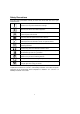
1.2 Icon description
The icon description as bellow:
Tab 2.1
2. Quick Setup
Admin Password:
Login Password: Set the password for login.
Wi-Fi settings:
SSID: Set the network name of this device.
Security: Configure the security mode for Wi-Fi connection.
3. Connection
You can move the mouse to "Connection" and click the items you want. In this section,
the following items are included:
Connection Status: current connection, WAN status, WLAN status;
Profile management: manage account settings, which includes your preferred
Category
Icon Display
Signal Strength
From no signal to excellent
Connection
Status
Disconnect Connected
SMS
disable, enable, SMS is full, Unread
Battery
From lowest power to full power
Wi-Fi status
Wi-Fi is active
带格式的:
字体: Arial