
Operation Manual




Getting started
2
7
Other
2.1
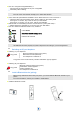
Installing the battery in the telephone
Installing the battery in the telephone
To remove it
2.2
Charging your telephone battery
Before inserting the battery
module into the phone, make
sure that its lock is in the
unlocked position
While maintaining the battery
module in position, slip the lock
to the locked position
Check that the battery module
is properly installed in its
housing
Slip the lock to the unlocked
position
Lift the battery module from the
bottom
You can then remove the
battery module
3
3
It is important to fully charge your phone before using it for the first time.
Connect the charger and place the telephone in the
charging holder ;. The battery charger LED lights. The
battery LED is in charging mode on the phone screen.
If the battery is completly discharged, a charging time of
several minutes is required before the set will light up
again.
A charging location in the back of the charger is
dedicated for loading an extra battery :
Open the protection cover in the back of the
charger
Place the battery in the dedicated location
An LED indicates that the battery is properly
installed and is charging