
Operation Manual



18
4.5
Make a second call
The operation of your phone depends on its single or multi-line installation. Contact your installer to know which
feature description must be used on your installation.
Switching between calls (Broker call)
Single-line set
Multiline set
Connect your two callers (Transfer)
4.6
Receiving a second call
Single-line set
Multiline set
4.7
Switching between two calls (Broker call)
You are in communication with the first caller and the second is on hold. You want to switch from one caller to
the other.
Single-line set
Multiline set
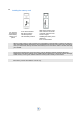
You are in communication with a first caller
Dial directly number
The first call is on hold
You can call the second caller from the directory using the keyboard shortcuts.
Enter the feature code
Switch from one call to the other
Hang up
R
CLR
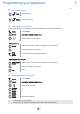
You are in conversation and a caller is trying
to contact you: Display the callers identity
You wish to take the call immediately:
Enter the feature code: On hold call
consultation
First call is automatically placed on hold
First call is automatically placed on hold
R
2
ABC
Enter the feature code: Broker call
You are in conversation with the second caller and the first one is on hold.
Enter the feature code: Broker call
You are in conversation with the first caller and the second is on hold. You are back in
conversation with the first caller and the second is on hold.
You are in conversation with the second caller and the first one is on hold.
You are in conversation with the first caller and the second is on hold. You are back in
conversation with the first caller and the second is on hold.
R
2
ABC
R
1