
Operation Manual



15
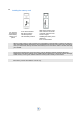
Redial from call log
You can call back from your phone call log.
3.8
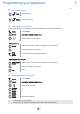
Programming your personal directory
There are 4 different number types:
Home
Mobile
Work
Other
Call Access to the calls log
All incoming, outgoing, missed or unanswered calls are displayed in the call log
Select the desired log:
All calls
Answered calls
Sent calls
Missed calls
Select the recipient from the call log
Send the call
OR
Call
The call log can also be accessed from the menu .
R
Without a memory card, your personal directory can contain up to 20 contacts (200 with a memory
card). A contact can contain up to 4 numbers.
Menu Access MENU
Select Access your personal directory
New contact
Place on cursor (highlight)
Select the type of contact (Home , Mobile , Work , Other)
Add
Save Enter the number
Save Enter the name
Yes Apply
To key in the name: the keys in the keypad include letters that you can display by pressing them
successively.
Example: press 8 twice to display the letter U.
When entering text, you can switch to the upper case mode, lower case and the numeric keypad by
pressing successively on the # key.