
Operation Manual




10
Enable Bluetooth
Install a Bluetooth device (pairing)
To use your Bluetooth device, it must be paired to the set. To manage the pairing, the Bluetooth device must
be in detectable mode. Refer to your Bluetooth device documentation to find out how to activate detectable
mode.
You must be in
possession of the
Bluetooth module for
your phone
Turn off the handset
Slip the lock to the unlocked
position
Lift the battery module
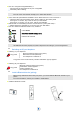
Insert the Bluetooth module (You
should hear a click when the module
is in place)
Installing the battery in the telephone
Turn on the handset
Menu Access MENU
Select Access the handset settings menu
Select the tab: Connectivity
Bluetooth
Select
Yes Enable Bluetooth
To disable Bluetooth, follow the same procedure by selecting No .
If the module is not installed, the Bluetooth menu is not accessible.
Your Bluetooth device is ready to be paired
Menu Access MENU
Select Access the handset settings menu
Select the tab: Connectivity
Search for
devices
Select
The set scans for available Bluetooth devices
Select Select the Bluetooth device to be paired
Ok Enter the device PIN code
Bluetooth device connected