
User manual


7
release the PTT Button to allow reception of incoming signals.
Whenever the button is pressed, the transmit icon (
) will appear.
When receiving an incoming signal, the Recieve (
) icon will
appear. The PTT button can also be used as a two-way call ringer.
Pressing the button twice quickly will call another party on the same
channel.
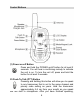
(3) Up Button
In the standby mode, pressing this button will increase
the listening volume. The current volume is indicated (1-
7). When in function edit mode this button will be used to
adjust the unit's settings.
(4) Down Button
In the standby mode, pressing this button will decrease
the listening volume. When in function edit mode this
button will be used to adjust the unit's settings.
Operating Modes and Features
PMR Operation
• Press and hold the POWER On/Off button for 2 seconds to turn
on power.
• Press the MODE button so the channel number flashes.
• Select the desired channel with the Up and Down Buttons. The
Recieve icon ( ) appears to indicate an incoming call.
• Press and hold the PTT button to transmit, then speak into the
microphone clearly and slowly. The transmit icon (
) appears
on the display while the button is pressed.
• Release PTT button to receive.
• Communication can only be accomplished when the channel
and CTCSS tone frequency of at least two parties are the
same.