
User manual

Aerosoft Vilnius X 1.00 Manual
Page 3 of 8
CREDITS
Concept: Arvydas Cetyrkovskis
Programming/ modelling: Andras Kozma, Arvydas Cetyrkovskis, Gabor Kovacs
Project Management: Mathijs Kok (Aerosoft)
Manual, documentation: Mathijs Kok (Aerosoft)
Installer: Andreas Mügge
Testing: Several good folks who will all be getting a copy
SYSTEM REQUIREMENTS
Intel Core 2 Duo E6850 CPU (Core 2 Quad advised)
2 GB RAM
Direct X 9 compatible Graphics Card with minimal 512 MB
Microsoft FSX (with SP2 or Acceleration), FS2004
Windows XP, Windows VISTA, Windows 7 (fully updated)
Adobe Acrobat® Reader 8 minimal to read and print the manual
(1)
(1)
Available for free, download at: http://www.adobe.com/prodindex/acrobat/readstep.html
CONTACT SUPPORT
Support for this product is done by Aerosoft. We prefer to do support on the support forum for one simple reason,
it is fast and efficient because customers help customers when we are sleeping.
Aerosoft forums: http://www.forum.aerosoft.com/
We feel strongly about support. Buying one of our products gives you the right to waste out time with questions
you feel might be silly. They are not.
INSTALLATION AND REMOVAL
Installation is simple. Unzip the file that you downloaded and start the exe file you downloaded and follow the
instructions on your screen. Make sure FSX (or FS2004) is closed and we do advise you to reboot your system
before installing. Make sure you are logged on as Administrator on the machine! After installing it can help to
defragment your hard disk. Do note that the files are personalized on installation. When you share them with
others you also share personal details.
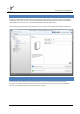
After installation has finished the Aerosoft Launcher will start and the
Removal should never be done manually but only using the software removal applet you will find the Windows
Control panel.