
User`s manual

21 Chapter 2
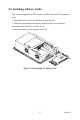
2.5 Installing Add-on Cards
This system supports two PCI cards or one PCI and one ISA expansion
card.
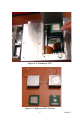
1. Detach the five screws on the back to open the lid.
2. Take away the adapter bracket by detaching the screw which is
mounted in the little box (see Fig. 2-10).
3. Insert the add-on card, and put on the lid.
Figure 2.10: Installing an Add-on Card